Back in July I’d been trying to decide on purchasing a robot lawn mower to, at the very least, reduce the amount of time it takes for me to mow my roughly 2.5-3 acres of lawn on my 10 acre property. It takes at minimum 3 hours with a standard 54” Cub Cadet riding mower. My whole lot is pretty heavily wooded, but has a couple of larger open areas, with LOTS of slopes, obstacles, and other complications. I eventually settled on purchasing the Pro mower. I’ve received my core unit, but had not opened it until a couple of days go as I needed to make quite a few preparations to support both the data center and the charging pad.
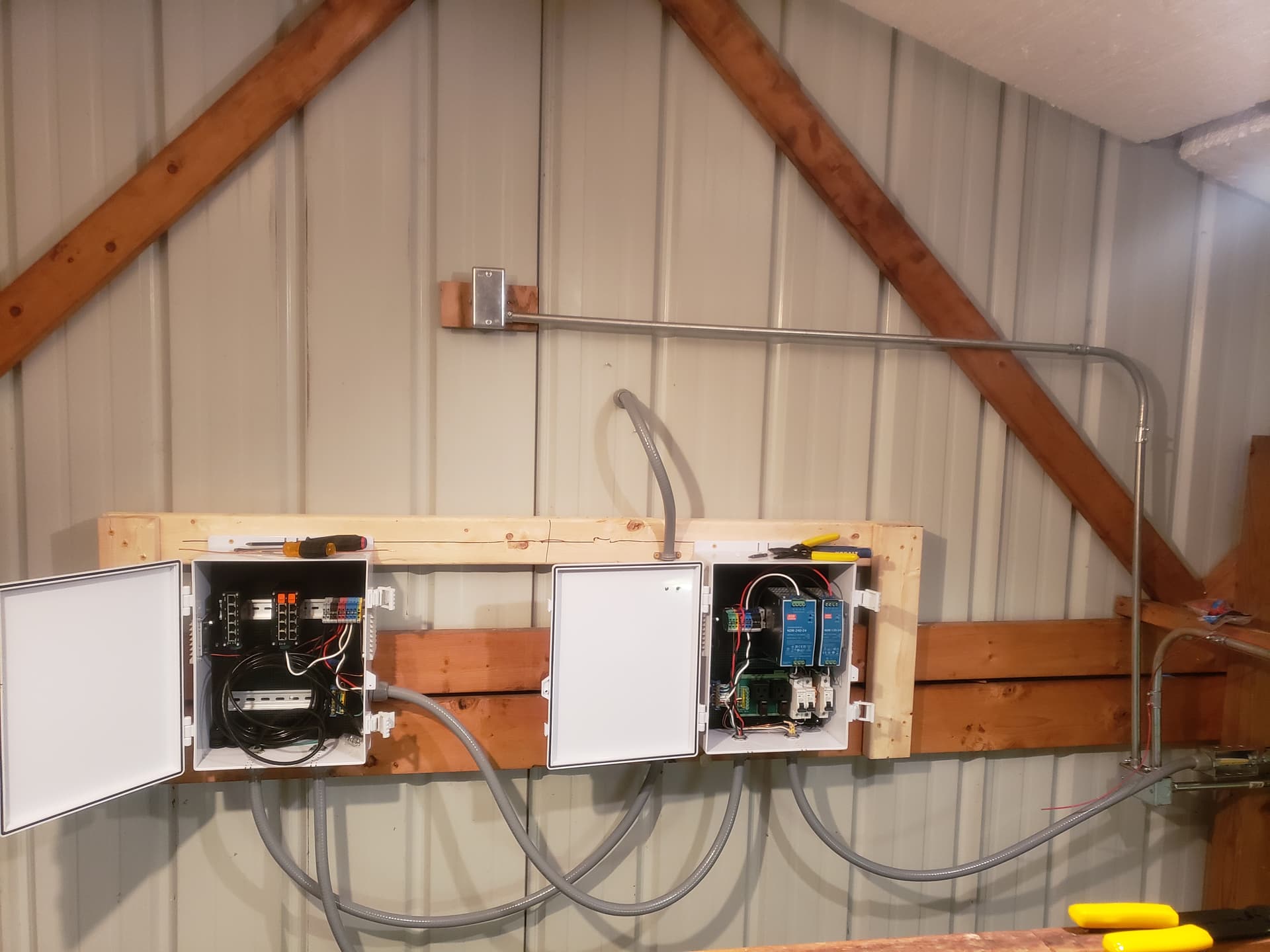
So over the last few weeks I’ve been adding electrical runs and network access to the pole building on my property, and I just turned everything on for the first time last night and plugged in the data center. This evening I’ll setup the charging pad and put the battery in the rover. It’s been quite a bit of work running all that conduit and cable, and putting in the network equipment, but I’m hopeful that this will all be worth it in the end.
Also looking forward to finally receiving my tracking number for the mower head.
You might need to relocate the DC because of that tree. There is a survey mode in the app when you do the data center install. Keep an eye on the CNR value at the bottom of the meter. You want 40+ for the best signal. The DC needs 120 degrees clear view of the sky. The rover needs 7ft of clearance all around and a clear view as well on the docking station. Something to keep in mind.
Enjoy your Yarbo journey! Here’s the official knowledge base for your reference: Home | Yarbo Wiki Also, feel free to ask any questions you have and share your experience here in the forum!
You may already be able to do the mapping so you can try Yarbo mower within warranty period. Maybe confirm warranty period for the whole unit if things arrived late. I could not test my mower because it arrived out of mowing season.
So far vision still doesn’t seem to work (meaning some of us can’t use it in areas where children may have been playing), three point turn is spotty at best and often ruins the turf instead, hilly areas are sometimes only partially mowed. Use under trees is not noticably worse than mowing in flat land for me for some reason. I also notice some mostly flat areas have unmowed patches here.
Test quickly, see if it works well enough, know support is super friendly whilst issues go unresolved. The forum has a vew very verbal and extremely positive and friendly people always searchig for workarounds to bugs. We are all waiting for fixes to fixes for the basicowing ability so I hope you choose to let funds roll in for Yarbo whilst they sort out how to make the robot move. Don’t expect to save time over a good manual setup, expect to invest instead.
Ya, when I turned it on last night I got the blinking red light on the DC and the signal meter only only went half way up the graph… which is unfortunate. There’s really only one other location with a better view of the sky, but that means putting holes in my house and it’s at one edge of my property. I specifically didn’t choose that location because I feared that with the terrain and the structures that the communication between the DC and the rover would be obstructed for the largest portion of the yard I wish to mow… But it looks like I may not have any choice. I may be able to move the DC to the other end of the pole building and get a better view, but that’s 100’ away and I’d need new cables… Such is life, yes?
Also, getting 7’ clearance for the charger AND an unobstructed view will be nearly impossible unless I just put it out in the middle of one of the two open yards. And even that depends on your definition of “open view”
The rover and data center don’t need line of sight to each other. They just need to see the same satellites. Regarding the dock, you can park the rover where you want to setup the dock. If you have 10+ L2 satellites and an Heading DOP of below 1.5 several times of the day, you should be good to use that spot. 7FT is the general rule, but you can fudge that some in the rear and sides. It does need to 3 point or zero turn directly in front of the dock though. There is a turn test when you setup the dock. Give it a test.
When I had it up last night, it was fluctuating between 22 and 23 satellites, but the DOP didn’t show a value…. I think. That was 10 hours and a sleep cycle ago and I wasn’t exactly paying attention to details as I was shutting down for the night and was already up way later than I would normally. I figured some of that was because I was unable (the app wouldn’t let me) to set up the DC, I’m assuming because of the low signal quality.
As far as mapping goes, I do know I’ve got one major No Go zone I need to setup. Having a 6’ deep sinkhole on your property is interesting, but not fun.
I received my core module back at the beginning of July but only just got the DC out of the box last week, and the robot out last night. In fact, I only just received my registration e–mail for the robot last night after I powered it on and connected it to my WiFi. Also just received the e-mail for the pro mower head which should be arriving (hopefully) in a week or two.
I’m not really worried about the 3-point turns as I plan to exclusively use the spiral pattern everywhere I can. This already mimics how I currently mow. My yard is visible to no one but me so I really have no interest in stripes or the like. In fact, the spiral mowing pattern was one of the other options that attracted me to Yarbo over the other products on the market. That and the size of yard that it can handle.
Really, at the end of the day, if it only reduces my actual mowing time by half I’d be happy with that for now. With as complex as the shapes of my yards are, I was already figuring that I’d have to take at least 15-20 minutes a week to go around and hit the perimeter with my riding mower anyway just to keep the perimeter established and trim back the brush and vines. I’ve got a LOT of wild raspberry vines around the perimeter of the larger open areas, and they spread like wildfire. Again, considering that earlier this summer with all the rain we were getting and the hot temperatures I was having to mow a minimum of once a week and sometimes twice just to keep the grass around 3-4 inches, and it was taking a minimum of 3 hours every time, if Yarbo helps me cut that in half I’ll consider this a success.
Good luck with that! Three point turns can also be used with spiral mowing to keep the grass fresh. Same issues seem to exist. I’d be happy if the grass would get cut, the Yarbo doesn’t need to be checked, Yarbo doesn’t mow small trees or flower beds, and I can leave an occasional table or chair on the lawn.
Patterns are an extra for me too. I’ve resorted to patterns to try and have less destroyed patches. I do hope it will work for you.
If it could be any other help: I stopped mowing the whole lawn and only mow roads and small areas. This way I can walk by the trees and flowers and there’s way more butterflies and birds and all that. If you have a larger area that may provide a nicer place to walk around in. A robot mower should be extremely well suited for this as it can slowly go through all the areas though a garden tractor is also fast at running through the track.
Good luck! Let us know what works and what doesn’t.
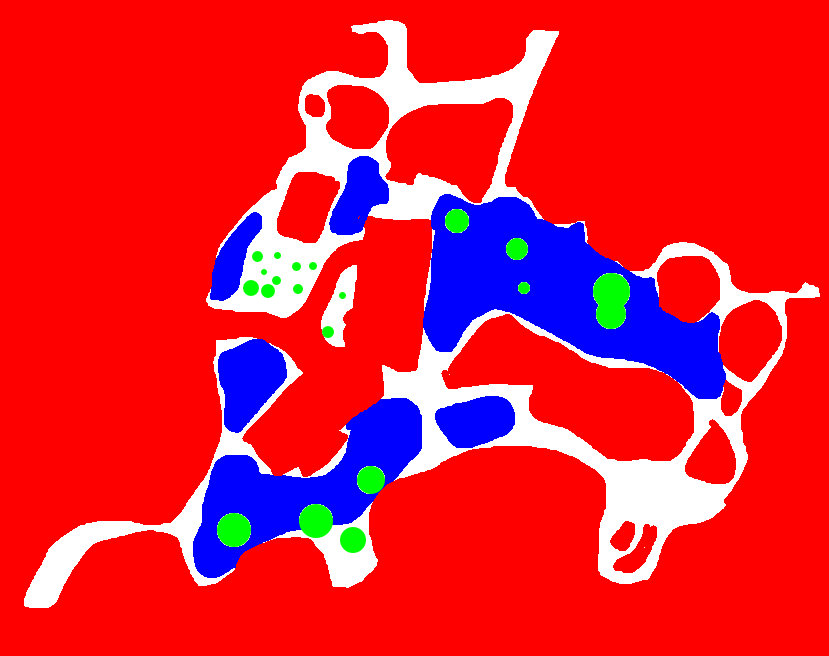
Just for reference, here is a ROUGH sketch of my yard. Red is no go, Green are large trees (canopy, not trunk), and Blue are the “open” areas…. I wasn’t kidding when I said it was complex.
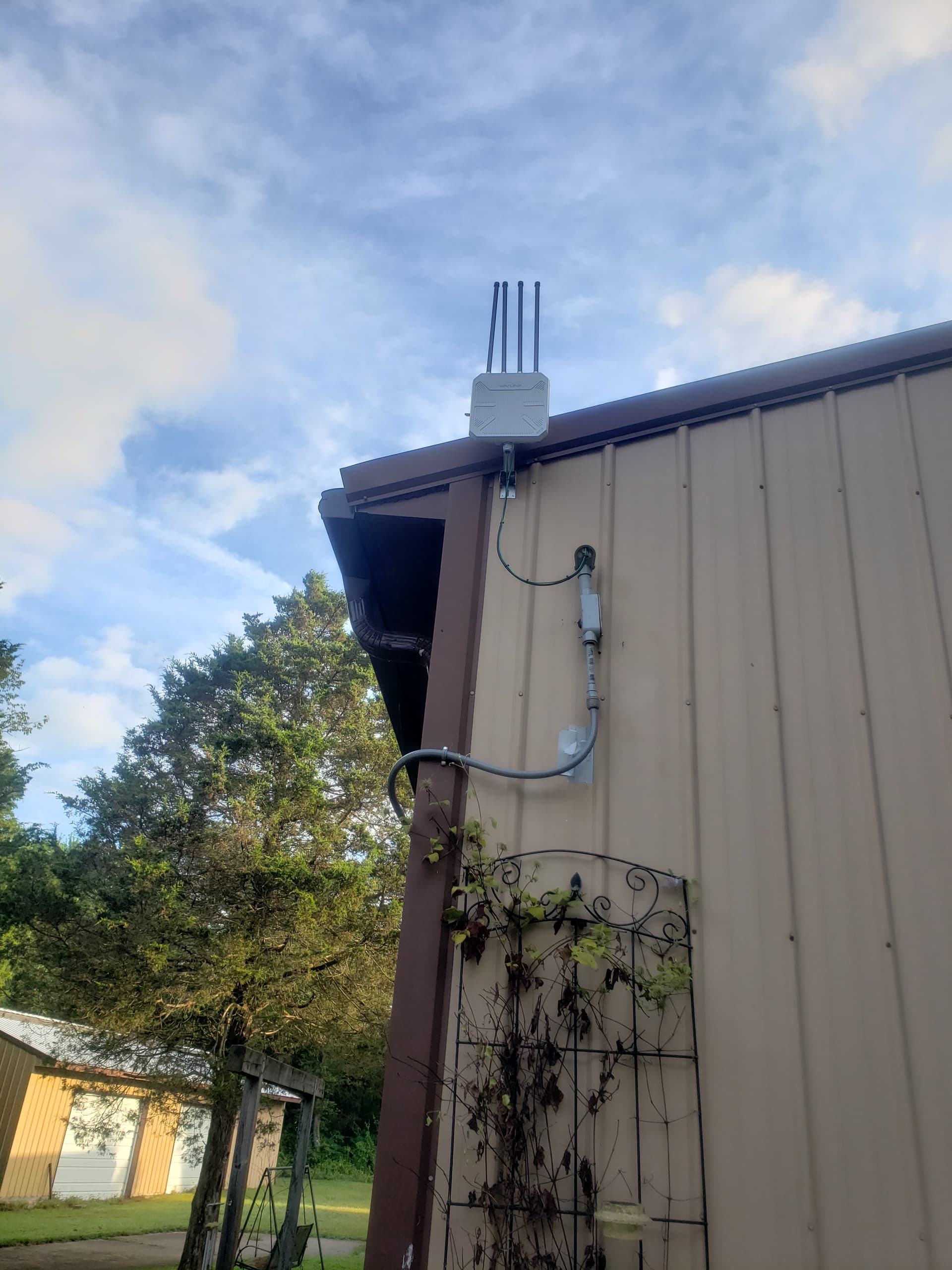
Well, yesterday I moved the DC out to the center of the roof and was able to get a green light. Yay! Took me most of the day to do it and had to reinforce the roof where I was tying the antenna mount to, but I got there.
Then came the next fun of trying to set up the docking station. When I turned on the rover it was initially working ok, then just randomly stopped and became unresponsive. Then I remembered the firmware update that just came out. So I waited and eventually it came back to life and I was able to drive it out of my garage. Interestingly, when it first came up it said “GPS Medium”, but when I got it out side and moved it over to where I was going to put the docking station, the GPS suddenly disconnected. I thought about it and figured, well let’s move it out a little and see if it comes back. Nope. I looked at the diagnostics, and it showed 18 satellites. So I moved it out into one of the more open areas, but still no dice. At that point it was getting late so I moved it back into the garage figuring I’ll try again tomorrow, but oddly a second or two after I got it into the garage, it said “GPS Medium” again and the GPS indicator on the app lit up. Below is a screenshot of the diagnostics page while I had it in one of the open areas. I recall mention of “L2 satellites” which I noticed the L2 in the diags said zero, which I’m assuming is bad…. Is there a chance that there’s something wrong with the rover? Of the two RTK antennas are they individually used for for different purposes? I ask because I seem to recall someone in another thread mentioning that when someone’s low mount wasn’t working, and I recalled when assembling mine, the SMA connector of one of the two low mounts was only sticking out by about 2 threads and I was worried that wasn’t enough to make proper connection with the antenna. I’ve also had plenty of experience with RF connectors and not making proper contact with the center pin when you though the connector was fully mated…
I would check your right antenna and make sure it’s making good contact with the cable. That’s right as you face the rear of the core. Your quality isn’t great and that could also explain some of the poor GPS issues. Hopefully it’s just a loose RTK antenna. If tightening doesn’t get you any L2, swap the antennas and see if the numbers change. If they do, it’s a bad antenna. If none of that works, contact support. Might be a software glitch.
The metal roof could be causing issues with your satellite and RTK signals. Metal surfaces can reflect, absorb, or scatter these signals. Something to consider.
If that is indeed causing a problem here, I’m not sure what I’m going to do. There is a spot on my house I could mount the DC, but it has a more obstructed view of the sky than the current location. I’ll have to think about that a little and see if I can come up with a potential RF solution to that issue. My hope would be with the angles of the roof, the height of the surrounding trees, and the height of the antenna off the roof, that most of that kind of interference wouldn’t be too much of a problem.
The roof is definitely not your current issue. It’s with the rover. You’ll probably be fine and a mitigation could be some sort of coating to help absorb the signals instead of reflect them. Any plastic or wood could also help. But I think it’s high enough you might be ok. How does your DC diagnostics look? You can access that from inside diagnose tools under the RTK section. It’s the yellow details link.
How can you definitively say the roof isn’t causing the rover issue? What reading are you basing that on? The roof could absolutely cause the rover to see nothing. It’s not the most likely cause but it is a possibility.






 Also just received the e-mail for the pro mower head which should be arriving (hopefully) in a week or two.
 Again, considering that earlier this summer with all the rain we were getting and the hot temperatures I was having to mow a minimum of once a week and sometimes twice just to keep the grass around 3-4 inches, and it was taking a minimum of 3 hours every time, if Yarbo helps me cut that in half I’ll consider this a success.