I’m an early adopter and on my second core after the 2023 model died after a few months, so I have the 2024 core as a replacement. I purchased the mover and snow blower attachments. This was the first time I had the opportunity of using the snow blower attachment with around 6 inches of snow. It was a disaster. I discovered that in the morning the core had no connection to the DC. I rebooted the core and that temporarily fixed the issue but the rover would not venture into my map on its own. So, I tried manual (through phone app) control and it took 6 hours to partially clear a 150 foot driveway. The rover kept losing signal where I couldn’t even connect via Bluetooth. And to top it all off, I received a chute blocked error message indicating that it was either blocked or frozen in place. The chute was clear, so apparently it was frozen in place. So, I’m now looking for an Ego snowblower to replace the not ready for prime time Yarbo snowblower. My experience so far with the entire unit has been so-so. It’s definitely not for a novice without any tech experience and it’s definitely not “plug and play.” I wish I could get a refund for the snowblower module and just keep the lawnmower, but unfortunately I’m past the return period. Buyer beware.
I’m sorry to hear of your really bad first impression using the snowblower.
Offhand, the first diagnostic step I think should be taken is to reboot your Data Center. After it is rebooted, see if connectivity is restored. If not, I would then reboot Yarbo a second time.
As for the actual snowblowing itself, ideally Yarbo should start clearing the snow when you’re at around 3 inch increments. So if Yarbo was unable to do so because of the data communication issue, it kind of set you up for failure.
Let’s get your data connection restored, and I think (hope) your opinion will change the next time it is used.
Hi there, I’m really sorry to hear about the frustrating experience you’ve had. We truly understand how disappointing this must be, especially given that this was your first time using the snow blower module in real conditions.
We do want to help and make sure you have a much better experience going forward. I’ve checked our system and can see your support ticket, and we’re currently waiting for your response there so we can continue troubleshooting the GPS and connectivity issues. Once that is resolved, you should be able to fully experience the automatic snow-clearing features of Yarbo.
We sincerely hope you’ll be willing to give the snow blower another chance after these issues are addressed, and we’ll do our best to support you in getting it working as expected on your driveway. Thank you for your patience.
I appreciate the response. Honestly, I’m tired of being tech support for Yarbo. I have spent many countless hours trying to get this unit to work correctly and as intended; however, that has not occurred. The lawnmower module works okay for the most part but trying to get the snowblower module to function effectively has been a challenge. I’d be happy if it could just work without a great deal of effort from me to diagnose issues, etc. It seems that this system is crippled by GPS issues and other software issues as well as some quality control issues. My chute is giving me an error message indicating it’s blocked. There was no blockage, so it looks like it’s frozen. This should not be occurring. At this point, I’m ready to throw in the towel and ask for a refund of the snowblower module.
Were you able to resolve the connectivity issue by rebooting the DC and Core?
If anti-freeze mode is enabled you shouldn’t get the frozen chute errors.
Rebooted and reinstalled DC and rebooted the rover to no avail. I have to send pictures to support to show them the setup. The rover and the DC are literally next to each other. The morning of the storm storm, I discovered that the GPS was disconnected and my map was lost. At that point I went through the rigmarole of rebooting and reinstalling and still no connection to weak signal even though the DC in indicated “excellent “ signal status. It would not budge on its own to the map area. I steered it manually into the mapped area and I received no gps signal. It was only literally 30 feet away from the DC.
Good to know. Maybe you can tell my Yarbo that?
Unless it’s a hardware issue.
I truly hope not. I’ve already gone through the process of having to replace my original rover after about six months of ownership and countless hours trying to “get the setup just right.” I can’t imagine having another unit replaced again. At this point, I’ve spent more time on just trying to set the Yarbo up than actually using it. Pretty sad in my opinion.
Update on the chute error. Apparently, the only thing that was wrong with the chute was the error message needed to be cleared and now it’s fine. Strange it didn’t clear on its own. GPS issues continue; however.
At least that’s a step in the right direction. What are your GPS issues?
GPS issues are intermittent to zero connectivity. My DC indicates excellent signal strength and sits right next to my rover. I’ve only seen a strong connection for one brief moment on the rover. Other times it’s either no connection, low or medium signal strength. The first snowstorm last week, the gps connection was totally lost to a point where I had to reinstall the DC and restore my map. So, needless to say, it was a total disaster. I really hope that I don’t have another lemon Rover. My next step is to relocate the DC to a higher location and see what happens. As I mentioned earlier, I think I’ve spent more time being my own tech support than actually using this machine which I’m not very happy about especially considering the cost. I love the idea of Yarbo, but I just don’t think it is quite ready for general use, especially if someone is not very technical. I build and troubleshoot my own PC and network systems so I have some tech knowledge. It is DEFINITELY not a plug and play system and should not be marketed as such.
Would you mind sharing your diagnostic screenshots? RTK, status, data center, and HaLow sections and also click details under RTK and share your DC CNR values? We might be able to help narrow down where the issue might be.


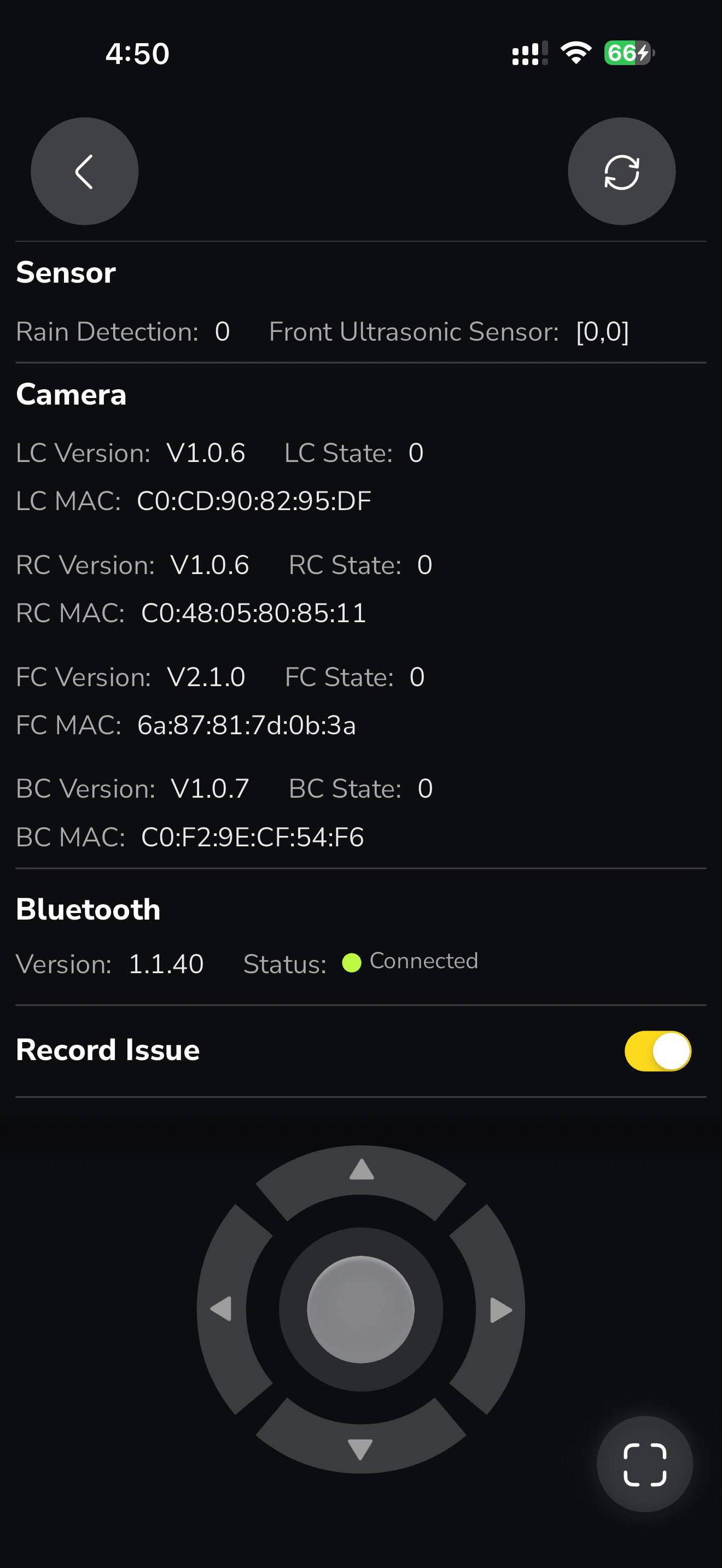
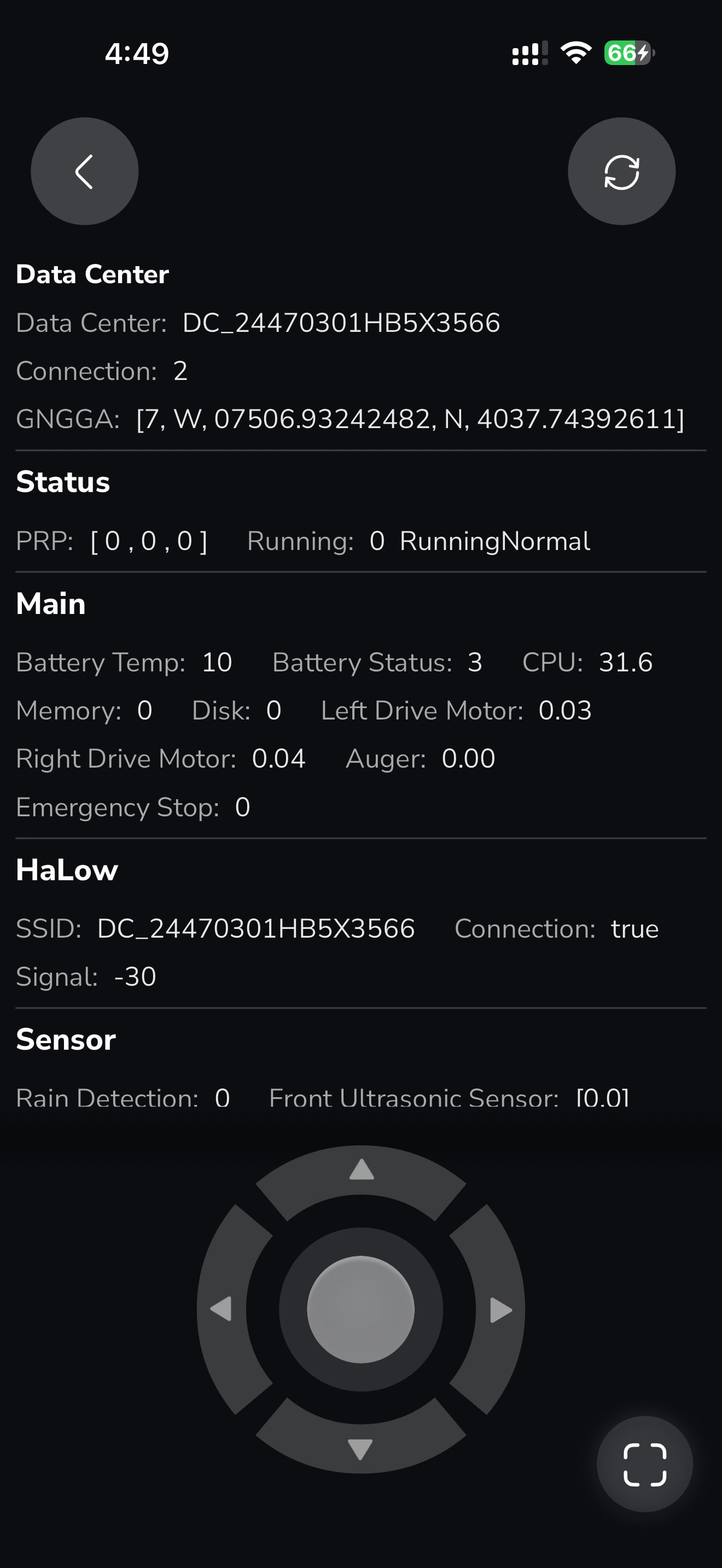

Now, the signal is strong. Makes no sense. And it won’t stay that way for long. As I mentioned
, it keeps rotating between no signal to low or medium signal and very rarely a strong signal. And this is the rover just sitting on the charging dock and not moving at all.

So it looks like your dock may be a bit obstructed based on your HDOP being a little high (1.6). When this happens if the core has been idle for a while it may take a while for the rover to wake up and acquire signal. Your quality can cause it to fluctuate quickly. As long as you have an RTK status of 4, you should be good to start a plan. What kind of issues are you seeing besides this? GPS pauses in the middle of a plan?
As I mentioned earlier I’m seeing wild GPS fluctuations from no signal to low and medium signal and rarely a strong signal. And these GPS signals don’t seem to be locked in so they can fluctuate back and forth with the rover just sitting at the dock. I also get numerous lost connections when I’m in a work plan. So, whatever is happening, the signal is unstable. I’m not sure if it’s a DC issue, a rover hardware issue, or a DC placement issue. When the weather is more stable here in NJ I’m going to relocate the DC to see if it makes a difference.
Your DC CNR could be better. 36 is the minimum and 40 is recommended. You have GPS above 40 surprisingly GAL is decent. They all don’t need to be above 40, but it certainly could help.
As for losing connection when it’s working, this might be Bluetooth related. Try disabling Bluetooth on your phone when it’s working. It can latch on and drop out from pretty far away. The app gives false indicators of network issues when this happens.
Have you tried swapping the RTK antennas left to right and right to left? Sometimes this can help clear up any GPS issues if there’s a faulty antenna. Also checking that the cable connections are tight as well as the antennas themselves are as well. Do you have a lot of obstructions like tree cover where you’re having the pauses?
