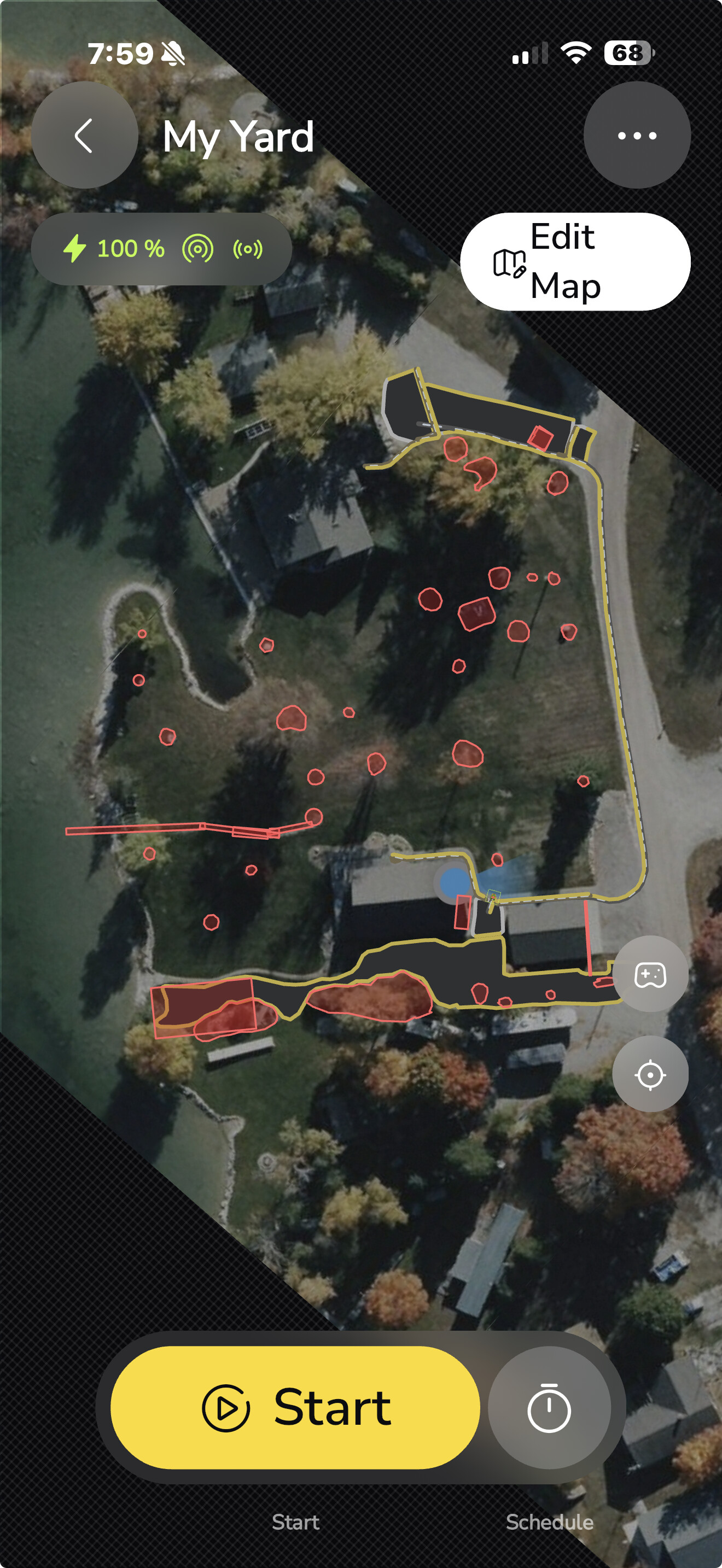
I’m having a hard time getting parallel sidewalks that run straight down next to the garage and then three that run next to each other in front of the garage.
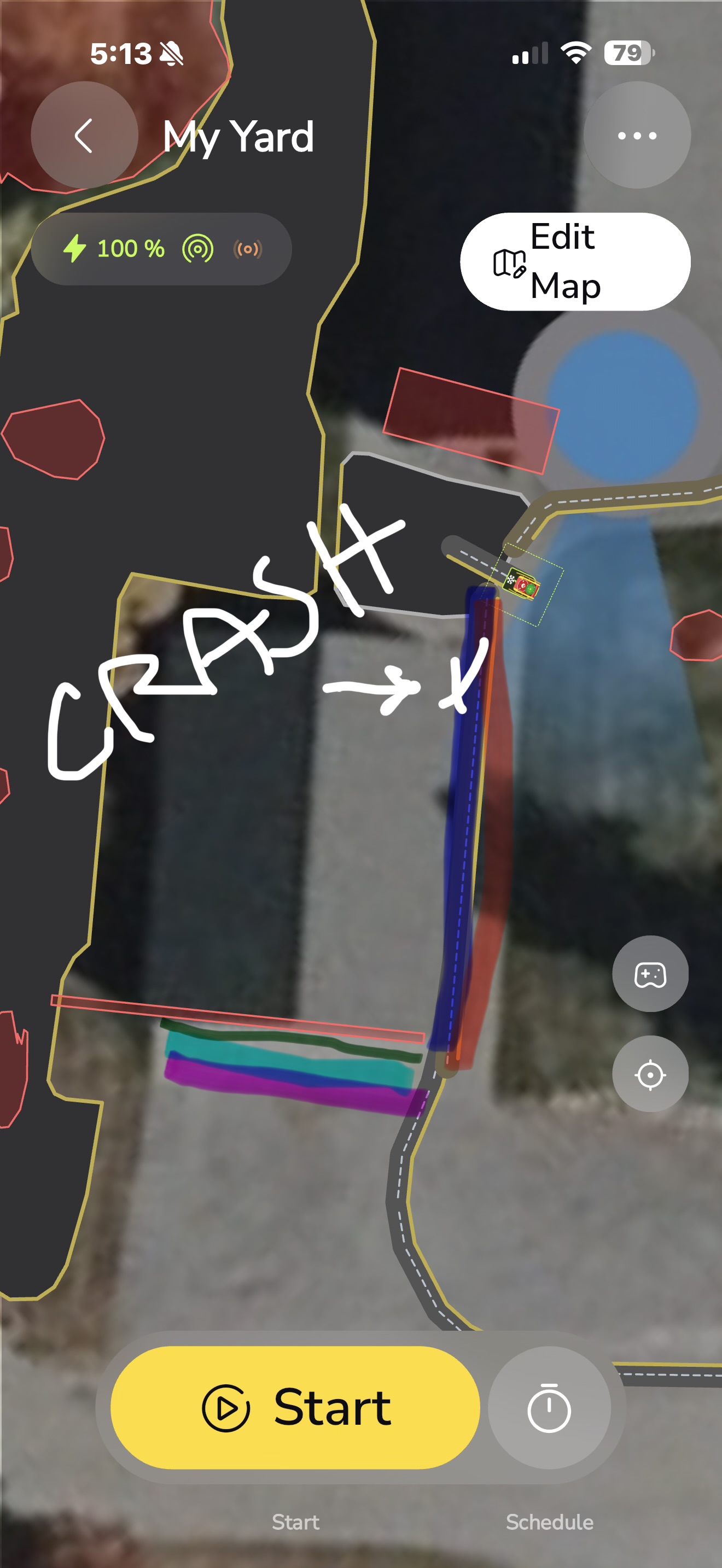
When Yarbo leaves the dock, it does the first sidewalk and returns no problem. Now with the second sidewalk directly next to it, it veers off way to the right outside the boundary of the Sidewalk and starts to try to crash into the garage to the right.- aggressively.
I have had 1 sidewalk there and it works fine in the past. I want my whole sidewalk clear which is just shy of 1.5 Yarbos. More like 1.326 Yarbos.
But when I put 2 side by side it is a major fail for me.
I did record the session in the app of the wonky path Yarbo would try to initiate on the second path.
I tried to redo an S pattern in front of the garage it preformed it backwards-Failed.
I also tried to place 3 parallel to the garage but are being run in a reverse mapped function.
My other sidewalk(s) on the map don’t get messed up and I have no issues. All single Sidewalks.
As a side note: there is a PATHWAY that connects my work area in front of my dock to an additional work area I have next door. So underneath both the parallel sidewalks I have to a pathway as the map is right now.. This is where the crashing occurs.
The first picture is for reference. I already deleted the Crashwalks for safety. But kept the single sidewalk that seemed to work.
The second picture is what I want to have happen but I cannot get it do to 5 independent sidewalks.
2 (Red Blue) along the garage and the 3 (green, teal, fuchsia) along the front
I’d bet you $100 that your issue is the pathway that’s underneath the sidewalks.
Maybe try deleting it temporarily and see if it resolves your issue.
My driveway apron is literally covered with overlapping sidewalks, and they all sequence properly. Knock on wood.
Yeah that’s what I was afraid of. It sooooooooooo long.
It’s how I connect my driveway next door. I have drawn that pathway so many times!!! Had too close to the road the time. 100000ft snow banks from the plow.
Hahaha
Put your Yarbo in your little red wagon next time you have to redo that pathway. 
If you lived closer you could do my driveway too.
Hmm.
Maybe you can create a new series of sidewalks as an experimental test. See if they will work properly if there is no pathway underneath. If they do work, then add a pathway that traverses the sidewalks and see if that breaks them.
Ugh, you’re right, you’re right! 

I think you’re right because I had 2 parallel sidewalks layered on top before and it took the pathway track instead of the first sidewalk back after the zero turn at the end of sidewalk 1. Because of that it then seemed to space out that pathway width and bumped a whole pathways width to start the 2nd Sidewalk. There isn’t enough room for that.
I’d rather these be 2 long parallel 90° stacked sidewalks starting by the DS with a reverse out 3 sidewalk closer up by the garage doors. (Big skinny long NGZ)
I just can get anything too close to the house with these sidewalks because I keep front end crashing into things.
I swear earlier on the diagram where I drew the crash it was trying to drive to the end of the sidewalk out on the apron to start the plan in reverse fashion.
It made these 4 moves 2 right and 2 left.
That clearing on the grass was me manually. The mapped sidewalks I set up are not on the grass only the hard stuff.
It was the house moving option. You might want to turn that off. 
Keeping in mind It did the other 94% of the plan perfectly.
Wait, can I use a sidewalk instead of a pathway to connect 2 work areas?
I don’t think that is the design intent.
The whole point of the pathways is to give Yarbo a path to get from Area A to Area B.
That said, it would be interesting to see if it can do that via a sidewalk instead.
I guess if I remove the pathway, remap the sidewalks -and it works. If the pathway is the culprit then I make assumption everyone else would have the same issue since mapping sidewalks, pathways, and route mapping should deliver the same outcome for everyone, no? Essentially we are working towards Yarbo not doing anything I didn’t tell it to do. Run the sidewalk from where I started to where I say it ends. Don’t do anything else.
My Yarbo shouldn’t act any differently than the next person who puts a sidewalk layered over a pathway.
Yes. Sidewalks are like a super pathway.
Except if I use a sidewalk it will just immediately return after it goes over there. It won’t stay due to the return to start position function of the Sidewalk, no?
So maybe I take the two parallel pathways along the garage. Then at the 90° down by the garage I would connect the pathway to the elbow of the 2 sidewalk turns? Instead of running the pathway all the way up to the work area by my DS.
Good point. I can’t recall if it would treat it like a pathway only when traveling or just ignore it. But code wise, sidewalks are pathways that don’t have to start and end in an area.