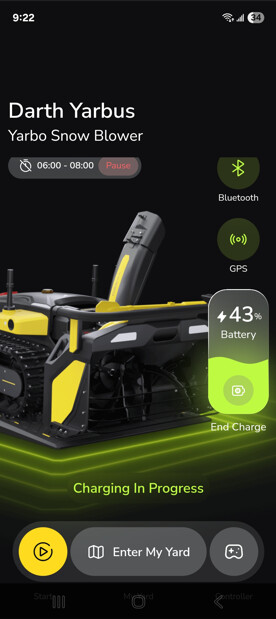
I would like Yarbo to go out automatically when it snows to clear the driveway, and have a manual schedule as backup that will go out between 6:00 and 8:00 to clear the driveway.
What I have configured:
In the app, under “schedule” I have:
-Turned on “Snowfall Notifications”
-Turned on “Automatically Schedules”
-Set up a schedule for 6:00 - 8:00
What is happening:
Not much. It snowed last night. This morning I woke to a covered driveway and Yarbo on its dock, napping. The schedule icon on the main screen indicates “Pause” (which it set itself to when I set the schedule). If i click on that, it turns to active and Yarbo heads out, even if it is outside of the 6-8:00 schedule. For example its 14:30 right now, if I click on the ‘pause’ icon, Yarbo heads out to do some snowblowing.
I’m pretty confused at this point. Can anyone provide insight on what I’m missing here? How much does it need to snow to trigger Yarbo? Is that a user setting? Any other advice? Thanks. Screen shots and a quick shot of Yarbo working today for eye candy. Thanks all.
I think what is missing is the actual snow notification. It may be un-reliable. I think (but am not sure) they use Apple weather service for the notifications. If the notification doesn’t “come thru” it doesn’t create the automatically scheduled plan. Which is likely what happened last night. That is my speculation….
I don’t know what service they use but I doubt it’s Apple’s service. Unless they are using the phones local weather service to make that determination, but I doubt it.
Thanks Ken, your comment about the notification is interesting. I have not seen a snowfall warning on my phone yet (3 or 4 snowfalls into the season). I had a look in the app, I dont think they are historized anywhere? I’ll keep an eye out at the next snowfall and see if I get a notification. Great call.
I’m still not clear on the manual schedule either, if anyone has advice.
I turned on snow notifications a couple of weeks ago. We got 5 inches yesterday but no notification. Does not appear to be working. Last winter I tried notifications and auto scheduling. Only had two storms but the accuracy was not close to right.
I have the same settings as @OhCanada with the same results. No notifications and no automatic schedule created. Woke up to 6” of snow and Yarbo sitting on the charger. I’m going to go out on a limb and say it’s not working or there is another bug in the most recent update.
I checked settings in the Yarbo app on my iPhone and noticed “Location” was set to “While Using” so I changed it to “Always”. Maybe that was the issue?
Hi there, there may be several factors involved here.
First, regarding the auto-schedule not triggering, this is likely related to weather-forecast accuracy. The auto-schedule is created based on the forecast data, so it relies heavily on the weather API. At the moment, there are indeed cases where inaccurate forecasts prevent the system from creating or triggering an auto-schedule even when it actually snows.
Second, the manual schedule you set should run during the specified time. Could you please go to Yarbo Settings → Work Plan History and check whether any plan was executed during your scheduled window? If something caused the work plan to pause, you should see an error notification in the Notification Center.
If none of the above explains the issue, I can also check the backend data for you (with your permission) to help identify the root cause. You’re also welcome to submit a support ticket so our team can investigate this further.
Hi there, this feature relies on the weather API, and sometimes inaccurate weather forecasts may prevent the system from triggering the automatically created schedule.
I will submit tickets for both issues, but can confirm there is nothing in my work plan history other than plans I have manually initiated.
For the manual schedule I get a notification at 5:55 that Yarbo will start the plan at 6. Nothing else happens. Yarbo doesnt leave the dock and no work plan is logged in the history.