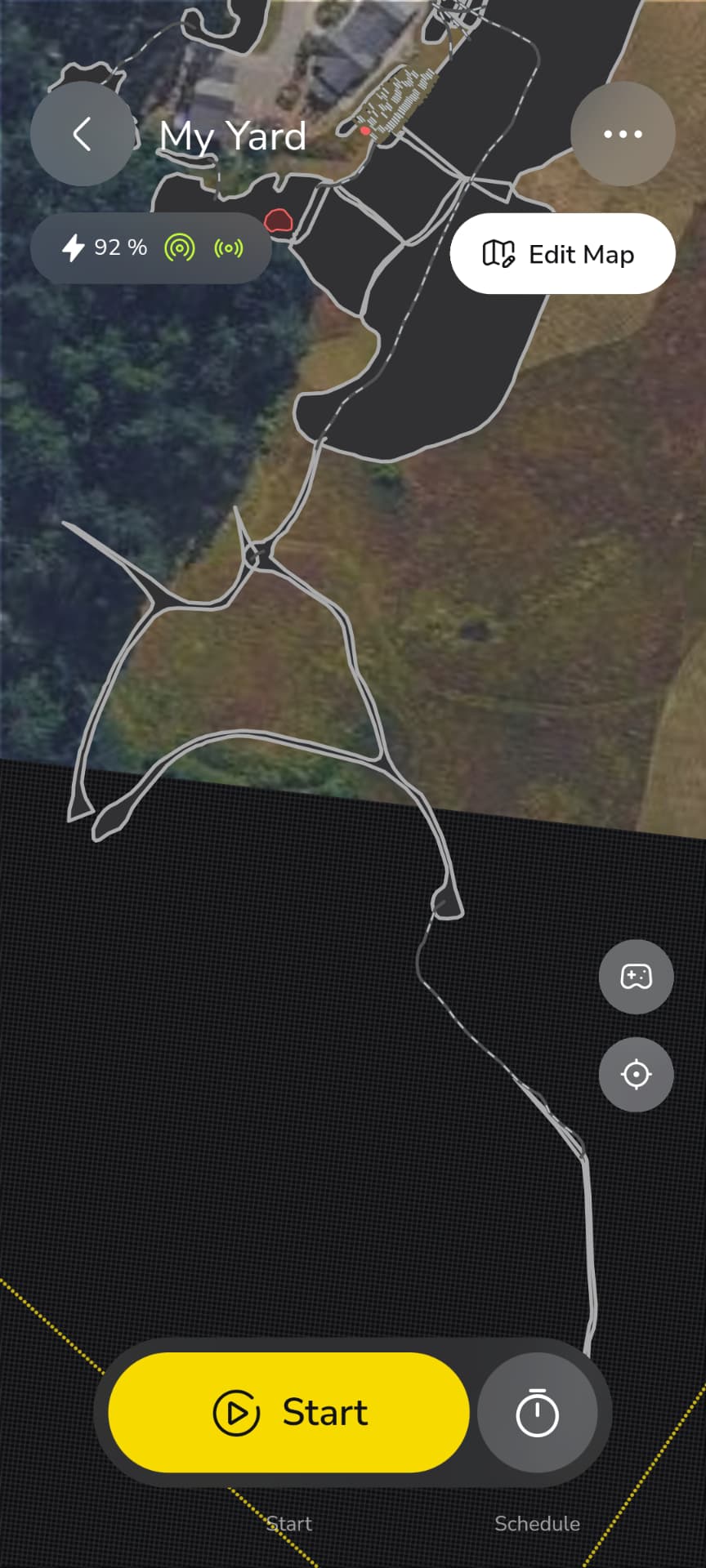
I’m mowing some walking trails through meadowland, and using some ideas here on the Forum, I’ve come up with some good techniches for mapping the trails. In all, there are miles of trails, and it would take a very long time to pilot Yarbo through the mapping routine.
So what I do is disconnect the mower module, and drive the robot into the tractor bucket and drive, putting the gps antenna near the middle of the tractor. Then I just drive the tractor, in Edit Area mode where I want the trail mowed. I add in pathways the same way. At the end of mapping, you just have to accept all the defaults and save. Yarbo thinks it’s a snow blower and wants to set auger speed and so forth. Just accept defaults and edit the plan once you have the mower re-attached.
I would love to take a Google map and a mouse and do the same thing, it would be so much faster. But this does seem to be a fairly easy and fairly fast way to help Yarbo do the mapping.
If there are any ideas out there to help facilitate trail mapping, I’d love to hear (read) them!
I agree, as long as Yarbo can be put into super fast mode. It’s really too slow for most mapping. My dog won’t even help me map anymore, she get’s so bored!
The pasture is pretty open country, but there were a couple of dropouts (past the 50 ft GPS allowance I have setup in Yarbo) that I had to work around. You will see that in the long trail at the bottom, that I’ll just have a pathway to. No big deal, but def a workaround.
Like I said above (edited in rather), Yarbo does think its a snowblower, so you have to edit in your mower preferences after mapping is complete. Hope a future update doesn’t kill the ability to map without an attachment!
My property is rough rural in the mountains. I get my first Yarbo tomorrow. Can I map my acres with this method first, and then modify sections to be more precise later? My only experience is my Robot Vacuum (RoboRock), and I can easily edit the map after its been created.
You could but I’d start small and learn the machine and its nuances first. Then go about expanding your maps out further. You definitely want to learn your poor gps areas and take some extra precautions there if there’s anything dangerous or sensitive for it to encounter.
Stay away far from ANYTHING that will rip the antennas off, or it can climb and flip over. Branches, fences, thick overhanging brush, stairs, kids playsets.
As you get confidence in the behavior near those locations (good or bad), you can adjust the boundaries a little at a time. Try to be risk-averse, so that you can tell things went bad without wrecking the unit.
At the end of the day, the GPS antennas, the Halow whip and the pigtails are consumables, so have spares. All it takes is one trailer hitch to be an inch lower than when you mapped it, and the Yarbo is down.
Don’t forget walls. If it is backing up and hits a wall, side of a house, etc it will keep going and ride up the wall. This has happened to me more than once in dead ends. It goes forward without issue but goes off course backing up. This was on totally flat ground.
I feel like this has gotten better over the last few updates as rear obstacle avoidance is refined. Of course, this is disabled if the tow hitch is installed, so I don’t advise leaving that attached unless you are using it.
No go zones are your best friend. Put a no go around anything stationary that Yarbo will encounter. Poles. Trees. Swing sets. Yarbo loves to either try to climb up stationary objects, or drive around them in weird ways and omit cutting half the yard in the process.
As the others have said, start small, and learn how Yarbo works. Then slowly increase the areas as you gain proficiency. And make sure Yarbo can’t drive under anything that could snap off the antennas.
It sure would be great to map out the areas with Google Maps on a desktop PC and if necessary, make any corrections later. Sure would save lots of time and moving Yarbo around the perimeters.
I had something that I totally missed that was ripping my GPS antenna off. Had to watch Yarbo go to his work area and see where he was going that I had totally dismissed earlier.
The idea of mapping via laptop and Google Maps sounds nice in theory, but is unfortunately not practical.
Mapping needs to be done using the Yarbo itself to ensure accuracy in the borders and no go areas. In short, Yarbo needs to know exactly where to go, and where not to go. Driving Yarbo around during this process ensures that there are no obstacles that it may run into or that may damage the antennas, etc.
How about creating a device like surveyors use to mark locations using GPS? Having a tracking device on a pole and pushing a button on the side to mark its location could be much better to use than having Yarbo drive to every point especially on large or complex areas. It could be much more convenient and faster.