I’m the proud new owner of the Yarbo Snowblower. I might have prematurely sold off my amazing Ego 28” cordless snowblower thinking I had a new solution… unfortunately, everything is going wrong.
It’s a bit hidden in all the sales literature and review videos how much this relies on GPS. I mistakenly thought the data center did most of the work and that was the purpose of it, but I’m sadly learning the rover also needs really good GPS a lot (or most) of the time as well.
I live at the base of a canyon in Salt Lake City Utah, and have amazing super tan pine trees around the driveway and along a lane that we also hope to use Yarbo for.
I’m repeatedly having difficulty getting Yarbo to map along the garage and corner of the driveway (top left) shown in uploaded images. It loses GPS there constantly. So I followed some guides to turn on the VPS and tell it to ‘go without gps’ for a bit of time. I got it mapped, but now on the first run the rover went way off course as it went down the driveway (to lower right) and drove right over the curb and almost into the creek. I assume it drifted a lot there and didn’t map accurately with the VPS settings?
Is there any kind of solution for someone like me with this garage on one side (which is the only side with power to put the docking station) and trees in the top right (counter clockwise corner) which is where it wants too start? When it heads there to start, it rapidly looses GPS.
GPS is strong in the middle of the driveway when it can see straight up and doesn’t have the trees and house in the way.
Is there any kind of strategy to get it to use that good GPS in the center and then go out to the edges?
I’m hoping I haven’t just bought a very expensive paper weight considering my driveway and it’s surroundings.
Appreciate any help on how to get Yarbo to work successfully!
Can you post some screenshots of your diagnostics screen (RTK, Status, Data Center) where it is having an issue? Did you adjust the PPVS settings at all to get it to map? How does your DC CNR values look?
Hi there, and welcome to the forum! Sorry to hear you’ve been experiencing issues.
As Bryan suggested, could you please share a screenshot of the Diagnosis page when the GPS problem occurs, as well as the PVPS settings you adjusted? This will help us understand what’s happening during mapping and navigation.
Also, could you let us know where your Data Center is installed? Its location can also affect positioning and signal stability in those tricky areas.
Thanks for sharing the details so far—we’re here to help you get Yarbo running successfully!
I’ll start by saying, I’m sorry you have apparently had a bad experience with your Yarbo. Is there anything you still need help with? The members of this forum are always here to help.
That said, I don’t think it’s productive or helpful to cause other owners to be fearful or regretful of their purchase. While there are issues that pop up occasionally, I don’t think the vast majority of us owners regret our purchases.
On the diagnostics page, you’l’ see two GNGGA entries. One is marked Rover GNGGA and the other on is simple marked GNGGA.
Those entries contain the Latitude and Longitude of the Rover and the Data Center. Ie. your location. Some people don’t care to share their location but others would prefer not to.
If you dont wish to make your position know obfuscate or remove those two entries.
Here is where they are found on the diagnostics page:
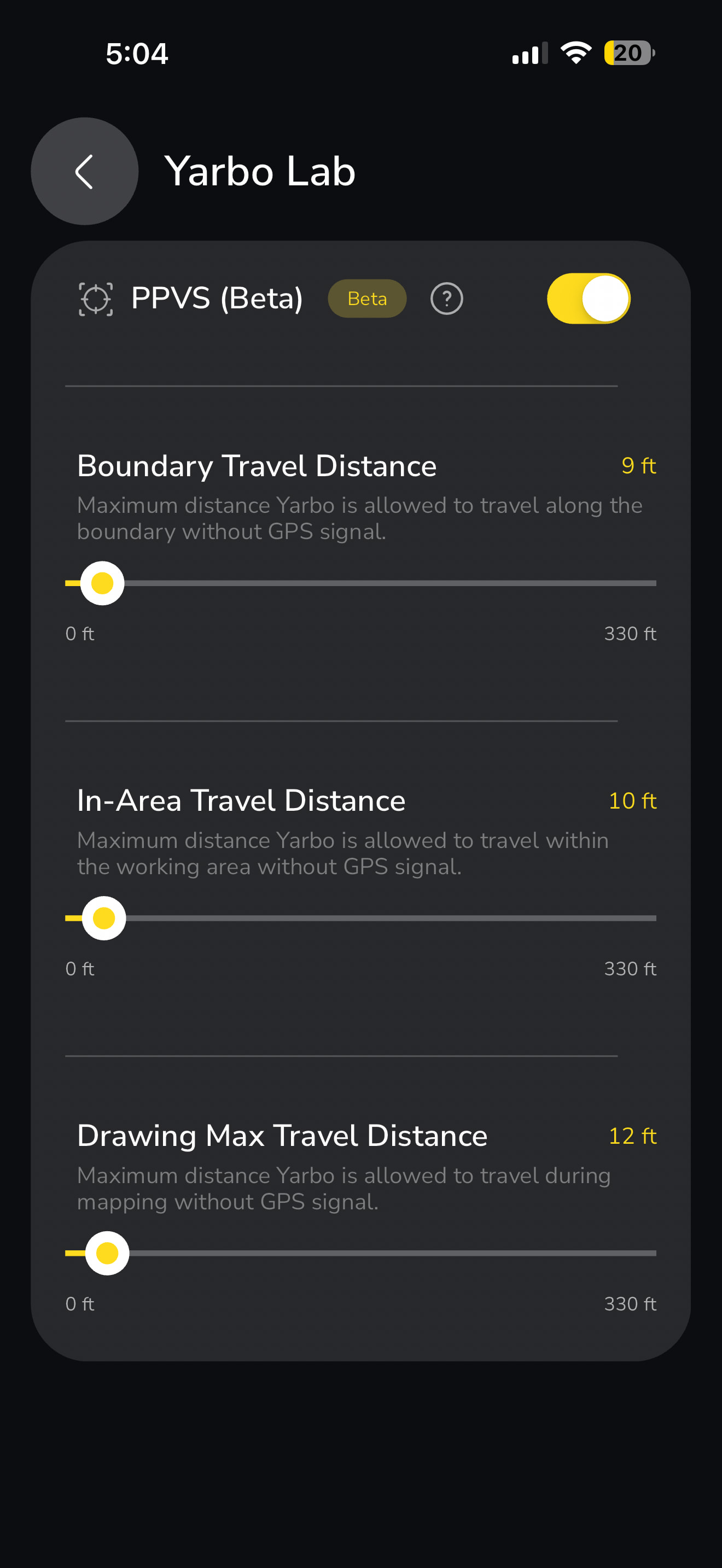
Thanks everyone for the help above. Attached are the requested diagnostic screenshots, I’ve attached a screenshot showing me trying to completely re-map the driveway from scratch (Yarbo Lab / VPS setting also attached).
You can see when I get down to the end of the driveway entrance (the most important part) the tall trees on each side are probably blocking GPS and it loses signal. It told me to take it back to a breakpoint, I tried to do that for an hour, it wouldn’t find the rover again and I had to give up.
What now? Suggestions after you see these screenshots of diags and the map?
I have the VPS settings a bit conservative (under 10 feet), because the first time I tried to get the map to work with higher settings (20 + feet) that was when Yarbo drove off the driveway and almost into the creek.
I’m really hoping I don’t have an expensive paperweight considering the tree cover around my driveway.
Can you do another 10ft adjustment on the PPVS setting to get you to your next shot at a signal? So you aren’t having to ram it up to 120ft? I know sometimes I literally need another 2ft sometimes for a good ping.
I think he said he tried it at 20 ft and it nearly went into the creek. I ran mine up A LOT at one corner of the house. It succeeded but you can bet your last dollar I’m watching the snow blower on that corner of the house. Fortunately there is a good view from the couch.
I suggest you temporarily bump up the PPVS settings a bit so you can complete initial mapping, then lower the settings and do some testing to see how Yarbo behaves on the driveway.
To me, I think it’s best to remain conservative with PPVS for now.
My bad I must have misread that. That stinks too because it didn’t occur to me that mapping without “green GPS” you could inflict core drift. Certainly logical.
To complete the mapping, you should only need to adjust the bottom slider.
If it was me, I’d only give it the bare minimum required to complete the mapping. Then to a bunch of testing to gain confidence they it won’t veer off course and end up somewhere it shouldn’t be.



 solution