So unless I’m at home and near my yarbo. It’s always disconnected. Can’t be at work and send it out to blow snow. Very unfortunate. It seems it needs my cell signal to get it online and then it finds the medium gps signal. Best I ever get fyi.
Not sure why it’s like this. Anyone else have similar issues??
Like @rgloverii suggested it sounds like the DC doesn’t have internet connectivity. Can you check your router where it plugs in and make sure that the LAN side of the POE injector is connected to the router and it has a link light? In the interim, enable cellular on the core. This will at least let you remotely connect when/if the DC is not connected to the internet.
So the DC always shows a strong connection. And I have cellular turned on and doesn’t seem to matter. Is it because where I dock it could be blocked by signal. It’s always low on the dock until middle of my driveway it turns strong.
The green light on the DC just indicates there isn’t an RTK issue. If you can only connect in close proximity to the core (IE with bluetooth) then that does seem to indicate an internet problem. GPS being medium shouldn’t affect you connecting to the core.
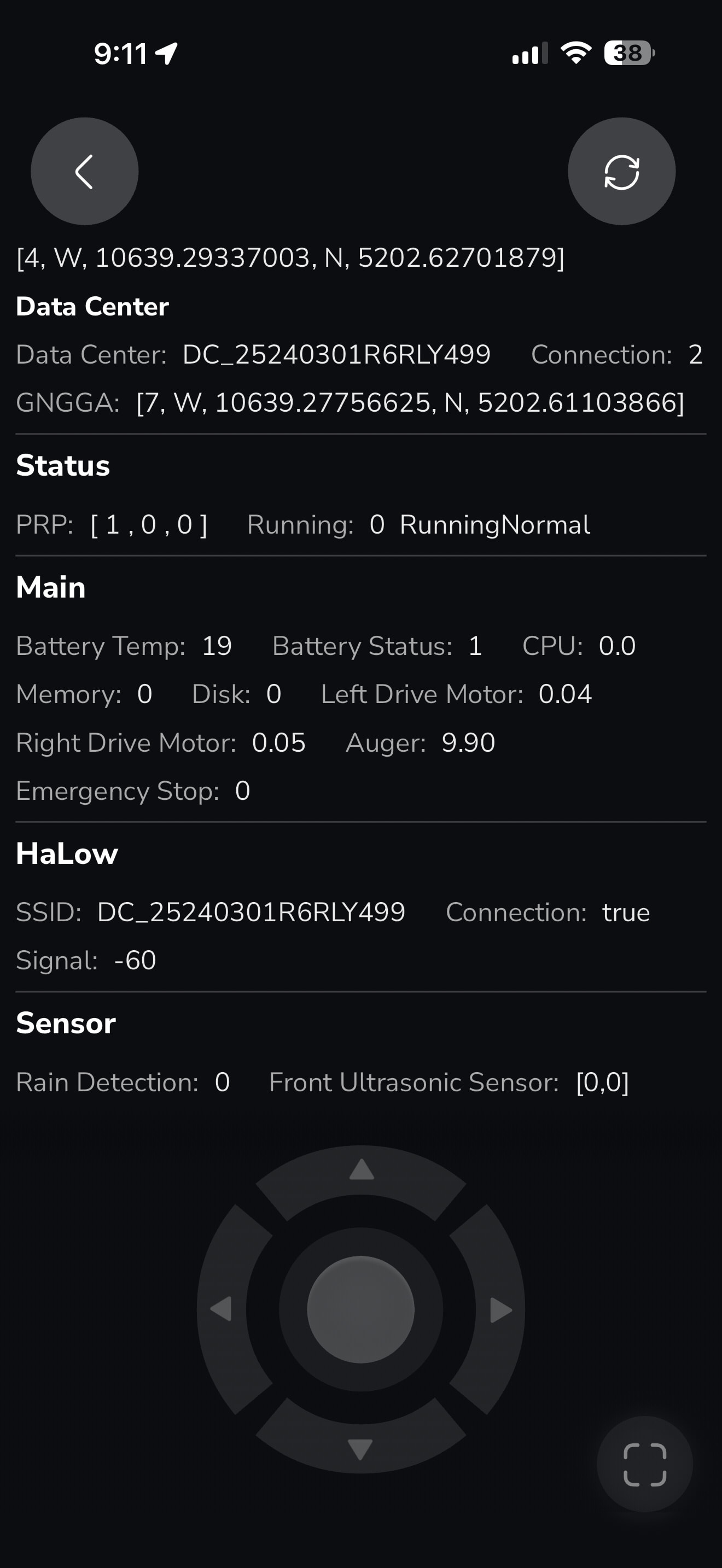
Just to confirm, you don’t have your core connected to your home WiFi. It’s not recommended. What does your Rover, Status, DC status show on the diagnostics page? Also the HaLow section.
That all looks perfect as well. Your DC has internet. Did you reboot it by chance? What does your Home Screen in the app main page (with the picture of the rover) look like?
Ah ok, that is a bug. Unplugging your DC for 5 mins and the go into safety settings, restart should help fix that. If it keeps happening, open a ticket.
“Just to confirm, you don’t have your core connected to your home Wi-Fi. It’s not recommended.”
Could you elaborate on why connecting the Core/Data Center to a home Wi-Fi network is not recommended?
I ask because I’ve been using my home Wi-Fi (without any Wi-Fi extender) since last fall, and it has worked very well. I was able to monitor and control Yarbo from inside my house while it was mowing over 300 ft away.
My current connectivity problem only started recently, after the latest app/firmware updates and subsequent troubleshooting. Based on extensive testing, it doesn’t appear to be a home Wi-Fi coverage issue. Instead, it seems more like a software or Bluetooth/Wi-Fi/cloud handoff issue.
I’m interested in understanding the reasoning behind the recommendation, because it differs from both my experience and what Yarbo phone support previously told me.
Most home WIFi doesn’t extend far past the home. The constant connect and disconnect seems to cause some network confusion. In some instances it even prefers WiFI over HaLow and HaLow is supposed to be first priority. You end up with weird network communication issues that present as loss of GPS, network errors, and just other random problems. Especially if there is a HaLow issue and in mesh networks where WiFi handoff isn’t working well. HaLow has far better range and is ideal for most properties. Support likes to tell people to put it on WiFi for some reason and that is just an old reference in their script I am sure to before HaLow. But can also be useful for them if they are troubleshooting HaLow issues and need to connect remotely. The ONLY time I recommend people use WiFi is when they first get the unit (new/refurbished) so that it can do it’s firmware update and then you can proceed with the install. After install, forget WiFi off the rover and turn on cellular for failover. The other time is when there is a DC or HaLow issue, WiFi can be a good stop gap for those with good WiFi in the yard. It saves on cellular data usage. If you are using WiFi on the rover and you see the WiFi icon, this indicates a Halow issue or an issue with your DC’s uplink to the internet. You should almost always see the HaLow icon in the app. This is what you want, not WiFi or 4G unless there are specific reasons that require this.
Thank you for the explanation. I’m still trying to understand the network architecture.
These screenshots were taken today while I was inside my house, far from both the rover and the Data Center, so Bluetooth was disconnected.
My diagnostics show:
HaLow: Connection = true (signal around -33 dBm)
MQTT Server = 1
Bluetooth = Disconnected
If I long-press the Network icon, it shows my home Wi-Fi (“rugby”) is configured, while Cellular is OFF. However, I have never noticed a separate HaLow icon on the main screen.
Could you clarify what communication path is actually being used in this situation?
Is the rover communicating with the Data Center through HaLow while using my home Wi-Fi only for Internet access?
Or is it communicating directly through my home Wi-Fi?
Also, one thing confused me. My Data Center has never been connected to my home network via Ethernet. It is powered only through the PoE injector, exactly as Yarbo phone support instructed when I installed it last fall. There is no Ethernet cable from the PoE injector to my home router. Is that still considered the recommended configuration?
I’m just trying to understand how these different communication paths work.
I am not sure why Support directed you to not connect the POE injector to the router, but this is why you need WiFi for the core to have internet. Your DC connection status is 3. This indicates that the DC and rover are communicating directly in a peer to peer network over HaLow for the RTCM correction data. This is essentially “offline” mode AKA no internet. This has the limitation of if the rover goes out of HaLow range, it will stop immediately with waiting for GPS because it cannot failover to WiFi or Cellular for an internet connection connect to Yarbo’s servers to get a stream of your DC’s correction data since the DC has no internet connection. This is DC connection status 2 (internet). During normal operation, it will flip between 2 and 3 to speed up transition to offline mode or use whichever mode is most stable (less latent).
I would advise you to attempt to connect the LAN side of the POE injector to your router and see if you can get a HaLow icon and see the DC on your router. One thing to note is, the DC can only do 100Mbps, so your router port needs to support that speed. Most do, but not all. Shutdown the DC and core before connecting so that they both boot up and get an IP address on your network.